
A different point of view
Photography
Perspective Lab
The most powerful change to a photograph can be where you stand. Explore the relationship between camera position, framing and depth.
The perspective simulator
One scene.
Different viewpoints.
Camera position controls perspective. Focal length controls field of view. Start with that distinction.
Explore the simulatorChange your viewpoint and save two views to compare.
Build your understanding
From observation to intentionI created this site to help you understand how perspective works in photography. I'll show you how moving your position, or your camera height, affects the size, spacing, and relationship between your subjects and the backgrounds, and why zooming with a telephoto lens produces a different result than just moving your camera.
Try the interactive simulator, explore the lessons, and test yourself with a few challenges and a quiz. My goal is to help you see perspective differently and use it to create stronger photographs.
How perspective works
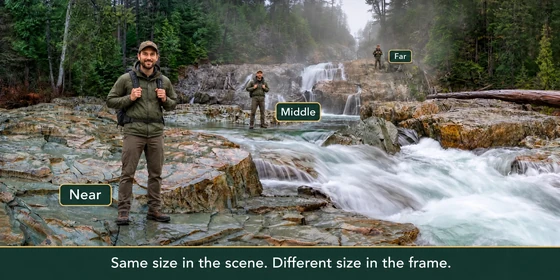
Nearby objects look larger because they're closer to your camera. Learn how moving forwards, sideways or changing height affects their size and overlap against the background. Use these changes to choose what stands out in your photograph.
Read the introduction ↗02 / Your positionMove first. Look again.
Move closer to give a foreground rock more presence. Step back to make the mountain behind it look larger in comparison. Learn how to balance near and far subjects, then compare viewpoints while keeping the foreground similarly framed.
Explore camera distance ↗03 / Your framingSeparate lens from location
Zooming changes how much of the scene you include. Moving changes how objects relate to each other. Learn why a longer lens alone doesn't compress a landscape, and when to adjust your focal length or choose a different viewpoint.
Explore focal length ↗